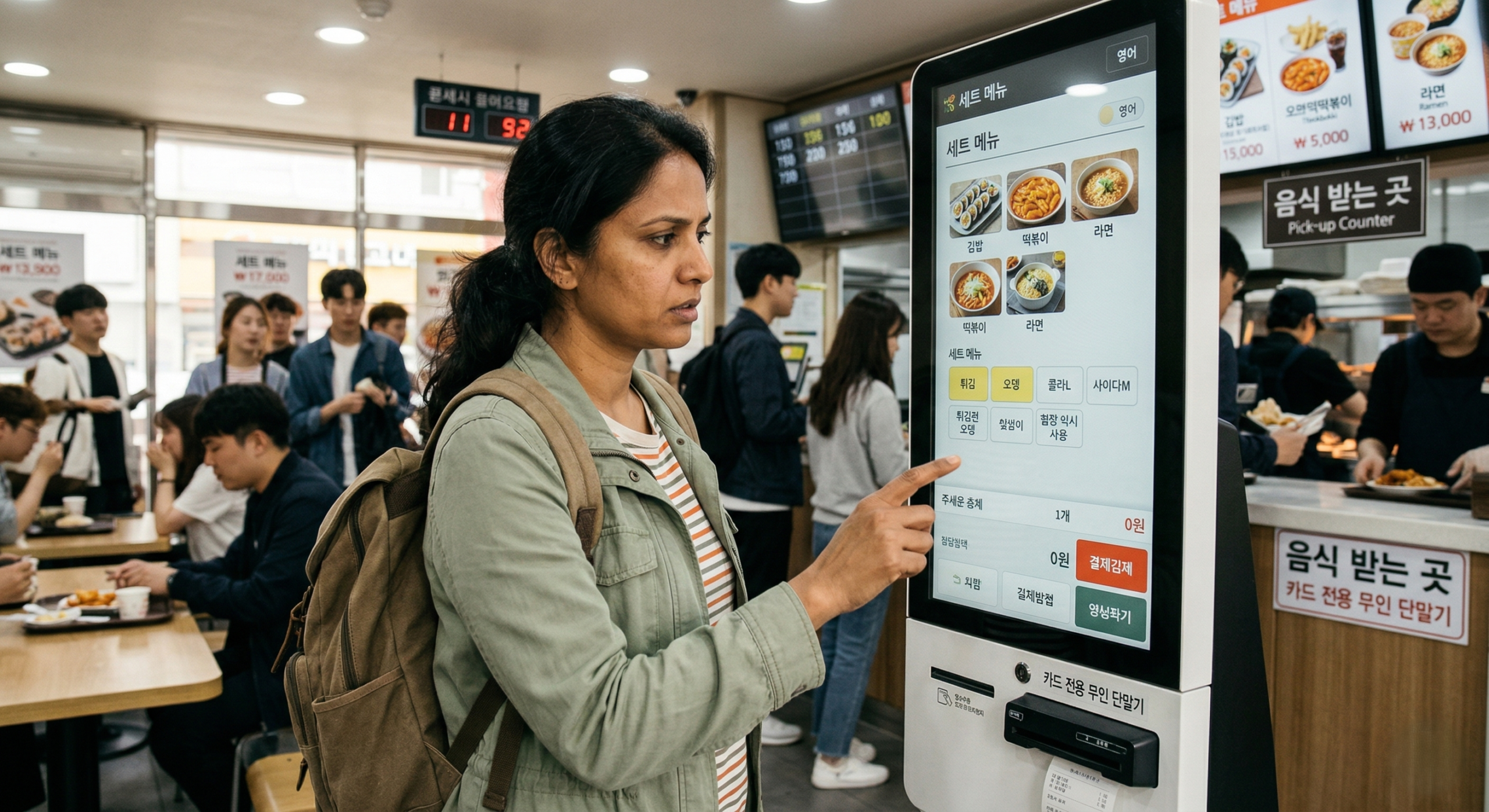
Using Self-Order Kiosks in Korea: How Foreign Travelers Can Get Through the Screen Without Ordering the Wrong Thing

Korea Local Guides

Using Self-Order Kiosks in Korea: How Foreign Travelers Can Get Through the Screen Without Ordering the Wrong Thing

A Korean kiosk rarely fails because the food is hard to choose. It usually fails because the order logic moves faster than first-time visitors expect — and by the time that becomes obvious, someone is already waiting behind you.

What actually matters Not reading every word, but identifying which decisions change the order.
What helps most Language mode if it exists, one quick translation scan if you get stuck, and watching how the room works.
What causes most mistakes Rushing the first screens, drifting into a set menu, and mentally checking out too early after payment.

If you have never used a self-order kiosk in Korea before, the stressful part usually is not choosing the food. It is figuring out the store’s logic fast enough to avoid making a mistake while people are waiting behind you.

That is the part most first-time visitors underestimate. From a distance, kiosks often look straightforward. The screen is bright. The photos are clear. The buttons are large. In a lot of places now, newer kiosks do offer language options, often including English and sometimes Japanese or Chinese. So it is easy to assume the hard part is already solved.

But that is not how it feels when you are actually standing there.

The real challenge is that the kiosk is not just asking what you want to eat. It is asking how you want to move through that particular store’s system. Are you eating in or taking out? Are you ordering a single item or entering a set-menu flow? Is the next screen asking something essential, or is it trying to upsell you? If the machine asks for a phone number, does that block the order or can you skip it? After you pay, are you supposed to wait by the counter, watch a pickup monitor, or hold onto a receipt with an order number?

That is why people freeze at kiosks in Korea even when the screen does not look especially complicated.

The good news is that you do not need perfect Korean, and you do not need to pretend that translation tools do not exist. English mode, Google Translate, and Papago can all help. But none of them fully replaces the one practical skill that matters most: reading the order logic quickly enough to finish one correct order without overspending, tapping the wrong thing, or getting lost after payment.

Keep this mental model in mind: a Korean kiosk is not just a menu screen. It is the front door to the store’s full ordering system. Once you stop treating it like a translation test and start treating it like a flow map, the whole thing becomes easier to handle.

Why kiosks in Korea still feel awkward even when they look modern

A modern-looking kiosk does not automatically feel foreigner-friendly. In fact, some of the most polished machines are the most stressful for travelers because they are designed for speed, not for explanation.

That distinction matters. A kiosk built for speed assumes the customer already understands the basic order flow. It assumes you already know which decisions matter, which prompts can be skipped, which screens are just upsells, and what happens after payment. That is perfectly normal for repeat local customers. It is a very different experience for someone who walked in ten seconds ago.

This is why the kiosk can feel harder than the menu itself. The language might be partially understandable. The product photos might be easy to recognize. But the screen still expects you to think like someone who is already familiar with how Korean casual dining systems tend to work.

There is also a visual-weight problem. Important decisions and unimportant ones often look nearly identical on screen. A critical choice like dine-in versus takeout might sit right next to a coupon banner, a rewards prompt, or a limited-time combo. If you try to read every button with equal attention, the screen starts to feel cluttered — and the actual decision that shapes your order gets buried under smaller distractions.

This is why travelers often say, “I could understand some of it, but I still got confused.” That makes complete sense. Kiosk trouble is not just about vocabulary. It is about timing, order flow, and recognizing which choice actually changes the outcome.

The hard part is usually not the food. It is understanding how this particular store wants the order to happen.

Before you touch the screen, read the room first

One of the best survival tips has nothing to do with the screen itself.

Before you start tapping, take five seconds and look around.

Watch what the person ahead of you does after paying. Do they take a printed slip and wait near a monitor? Move toward a pickup shelf? Stand by the counter until a number is called? Take a buzzer and go sit down? Is everyone using the kiosk, or are some people still ordering directly with staff?

Those details matter. In Korea, store logic is often easier to understand from watching behavior than from reading text. The kiosk tells you one part of the process. The room tells you the rest.

This is especially important in places where the ordering and pickup steps are not clearly explained in English. A traveler who puts all their focus on the screen but ignores the physical environment can still end up confused after paying. Understanding the flow before you begin — not after the order is already placed — saves a lot of awkward hovering.

Another useful habit is checking how many kiosks are available and whether one looks faster or less congested than the others. In busy stores, locals will often quietly move to the easier machine instead of stubbornly fighting with the first one. That is a small but very practical Korean-style efficiency move. You do not owe any particular kiosk your loyalty.

The first decisions that cause most mistakes

Most kiosk mistakes happen early and then follow you quietly through the rest of the order.

The biggest example is dine-in versus takeout. This choice looks too simple to be worth much thought, so people rush through it. But in Korea, that first tap often shapes more of the flow than visitors expect — affecting packaging, tray handling, and the assumptions staff make about where your order is going. Getting it wrong does not always cause a disaster, but it can make the rest of the process feel subtly off.

The next common trap is single item versus set menu. Many kiosks present the set in a way that makes it look like the default or the better-value option. Travelers often think they are still selecting a main item when they have actually been nudged into a larger order that includes a drink, a side, or both. If you genuinely want the set, that is fine. But if you only wanted the main item, the screen can quietly push you into spending more than you planned.

Then come the option layers. Coffee shops may ask about size, ice, syrup, extra shots, cream, toppings, and sweetness level. Burger places push combo upgrades, side swaps, and drink changes. Toast and snack chains pile on add-ons that look minor but raise the total quickly. None of these screens is impossible to navigate. The problem is that travelers start treating every option like it deserves the same amount of attention.

It does not.

Your first goal is not building a perfectly customized order. Your first goal is finishing one correct order — the right main item, the right dine-in or takeout setting, and a final price that makes sense. Once those are secured, the rest becomes much easier to judge.

A practical rule that holds up well: if a choice does not change whether the order succeeds or fails, it is probably not the thing to panic about first.

The Korean words that are actually worth recognizing

You do not need to memorize a long list of Korean menu terms to get through a kiosk. But a few words are genuinely useful because they keep showing up in places that matter.

포장
Takeout One of the highest-value words to catch early, because it can shape the whole order flow.
매장 / 매장식사
Dine-in Useful when the screen is deciding whether you are staying or leaving with the order.
단품
Single item Helps when you are trying to avoid sliding into a full set without noticing.
세트
Set / combo Important because this is where many visitors quietly spend more than they meant to.
추가
Add / extra Often appears on upsell or add-on screens where the price starts creeping upward.
품절
Sold out A useful word when the product photo looks available but the machine is actually blocking it.
주문내역 / 장바구니
Order summary / cart The review stage where you should slow down and check what the machine actually built.
결제
Payment High-value because some screens move fast and make it easy to pay before thinking twice.

Even when the machine is running in English mode, these words can still appear on smaller buttons, pop-up messages, or category tabs that did not get fully translated. In some cases the main flow switches to English but product names or add-on labels stay partly in Korean.

That is why recognizing a handful of high-value terms is more useful than trying to study everything in advance. You are not trying to become fluent at the machine. You are trying to spot the words that tell you whether you are paying, adding something, skipping something, or about to get blocked.

This is also where Papago or Google Translate can be used smartly. If one small Korean-only label is the thing blocking your decision, translating that label is worth it. But if you are trying to translate the entire screen line by line while a queue forms behind you, the process almost always becomes slower and more stressful than it needs to be.

Yes, many kiosks now have English. That still does not solve everything.

A lot of travelers now notice something genuinely encouraging: many newer kiosks in Korea do offer English, and some also include Japanese or Chinese. That is real progress, and pretending otherwise would make the guide feel out of date.

But it would also be a mistake to assume that a language switch fixes the whole experience.

First, not every store uses the same system. Some kiosks handle English much better than others. Some have a clearly labeled language button on the first screen; others hide it in a corner. Some translate the main order flow well but leave product names, promotional messages, or certain categories only partly in English. And some machines feel clean and translated right up until a small pop-up appears — and suddenly the most important button is still in Korean.

Second, even a solid English screen does not explain store logic. When the screen says “Set,” “Add,” “Next,” or “Pickup,” it can still leave a visitor unsure about what the store actually expects after payment. Translation helps with labels. It does not always explain behavior.

Third, travelers often miss the language button entirely because they start tapping too quickly. Before you touch the menu, scan the top corners or the start screen for a language toggle. In many stores, the language switch is easiest to access before the order begins. Once you are already deep in the flow, backing out to change it can be unclear or annoying.

So yes — if English mode is available, use it. That is the obvious practical move. But do not expect the kiosk to suddenly think like a travel guide. It is still a store machine built to process orders quickly.

Should you use Google Translate or Papago at the kiosk?

Yes — but treat them as backup tools, not as your main ordering strategy.

That is the most realistic framing.

Google Translate and Papago are genuinely useful when you hit one stubborn point: a Korean-only pop-up, a category label that did not translate cleanly, a small notice near the payment step, or a pickup instruction that is not clear. In that kind of moment, a camera-based translation tool can save the order.

Papago can be especially useful in Korea when small interface text or mixed Korean-English labels are the main problem. Google Translate works well in the same situations too, especially if it is already your go-to and you can aim, scan, and move on quickly.

Where both apps fall short is when the problem is not text but timing.

Standing at a kiosk with people behind you, translating every screen is rarely smooth. You still need to hold up your phone, aim the camera, wait for recognition, decide if the translation actually makes sense, and then return your attention to the kiosk — all while the pressure behind you builds. It is not impossible, but it is not a clean experience, and it is not the fastest way to place a simple order.

When translation helps

A Korean-only pop-up, an unclear category label, a small payment notice, a pickup instruction, or a membership screen you cannot tell whether you can skip.

Where it still falls short

Moments when the real issue is not vocabulary but flow — whether you entered a dine-in path, a takeout path, a combo-upgrade loop, or a post-payment pickup system you still have not read correctly.

Translation apps work best either before the stressful moment, or at the specific small points where an order gets stuck.

If you are in a quieter store and want to understand one confusing menu group before committing, scanning it is a smart move. If the main flow is already in English but a tiny pop-up appears asking something unclear, scan it. If the machine is pushing a membership or coupon screen you do not understand, scan it.

But if the real problem is that you do not know whether you have entered a dine-in flow, a takeout flow, or a combo-upgrade loop, translation alone will not fix that. That is a logic problem, not a vocabulary problem.

The most useful way to think about Papago and Google Translate is simple: use them to unblock one specific sticking point. Do not ask them to run the entire kiosk for you.

The membership, phone number, and points screens that make people panic

This is one of the most common stress points for foreign travelers in Korea.

You have chosen your food. You are moving toward payment. Then the kiosk suddenly asks for a phone number, membership login, rewards sign-in, points, coupons, or app-connected benefits. At that moment, it can feel like the order has entered a local-customers-only zone.

Sometimes the store really is trying to link the order to a domestic customer account. But very often, this does not mean you are stuck — it means the machine is offering the preferred route for regulars, not the only route for everyone.

Travelers tend to make one of two mistakes here. They either panic and assume they cannot continue, or they spend two minutes trying to navigate the membership system as if they were a local customer. Both approaches slow everything down unnecessarily.

The better move is to look for the exit path. The button might say something like skip, non-member, continue without benefits, no points, or simply next. It is often smaller or less prominent than the main membership button. It may feel like the less-obvious option. But for a short-term visitor, that is almost always the right one.

A helpful way to reframe these screens is this: if the screen is talking about benefits, it may not be talking about your meal. It is talking about the store’s customer-retention system. As a traveler, you need the meal. You do not need the customer system.

If you genuinely cannot tell whether a prompt is optional, that is exactly the kind of moment where a quick translation scan is worth it. One short look is useful. Translating the entire screen history is not.

After payment: the part visitors underestimate

One of the most underrated kiosk problems in Korea starts after payment, not before it.

Many visitors assume the order is done the moment the card goes through. But in a lot of Korean stores, payment is only the end of the kiosk stage. The pickup stage starts immediately after, and it can be genuinely confusing if you do not know what signal to watch for.

Some places print a receipt with an order number. Some display the number on screen and expect you to remember it. Some use a pickup monitor. Some call the number out loud. Some call out the menu item itself. Some hand you a buzzer. Food courts are particularly tricky — the ordering part often feels simple while the pickup logic is anything but.

This is why one of the most useful Korea-specific habits is simple: do not mentally check out the moment you pay.

  1. See whether a receipt printed. If it did, keep it until you have the food in hand.
  2. Check whether an order number appeared. Do not assume you will remember it later in a noisy space.
  3. Look for the handoff signal. A pickup monitor, a counter, a shelf, a buzzer, or a designated waiting zone.
  4. Watch the person who ordered just before you. In most places, behavior still explains the system faster than any wall of text does.

A small but practical warning: do not throw away the printed slip too early. Even if no one ever asks for it, it is your anchor to an order number — and that matters more than you would expect in a noisy or busy environment.

This is also why some travelers feel that the kiosk itself was fine but the store still felt confusing. They solved the ordering screen but missed the handoff system entirely. In Korea, those are connected problems, but they are not the same problem.

Where kiosks tend to be easiest — and where they turn messy fast

Not every kiosk in Korea deserves the same level of caution.

The easiest ones are generally in larger chains with standardized menu structures. Many cafe chains, major fast-food brands, and some organized food-court counters fall into this category. The screens tend to be cleaner, the flow is more predictable, and the machine is more likely to be designed with a range of customers in mind.

The medium-difficulty category is the casual local spot with a short menu but a store-specific ordering flow. These are the places that catch people off guard. The menu looks small, so the traveler assumes the kiosk will be easy. But the machine may reflect that particular store’s internal habits: bundled lunch sets, side-dish logic, drink add-ons, or pickup rules that are obvious to regulars and less obvious to everyone else.

The hardest kiosks are often the ones with too many branches in the ordering flow. Dessert drink chains, toast brands, specialty burger spots, and some snack-heavy places can become surprisingly slow to get through because the main menu opens into multiple layers of size, topping, side, bundle, and upgrade choices. The screen does not look hostile — it just keeps asking for one more decision.

That is where many visitors lose control of the order. They stop making deliberate choices and start tapping just to escape the screen.

If that happens, simplify aggressively. Choose the standard version. Skip complicated extras. Finish one clean order. You can always experiment more when you are not under pressure.

How to stop kiosks from quietly making you spend more

Kiosks do not only create confusion. They also make it remarkably easy to overspend without noticing exactly when it happened.

This usually happens through upgrade flow, not through any single obvious purchase. A drink becomes a larger drink. A main becomes a set. A side becomes a larger side. A topping becomes an “easy add.” None of these changes looks dramatic on its own — which is precisely why people accept them without thinking.

A good defense is deciding on a spending boundary before you even start. Not a detailed budget. Just one clear personal rule: one drink only, no set unless I actually want it, or one main item plus nothing I do not fully understand. That simple commitment changes how you read the screen, because it gives you a built-in reason to say no.

It is also worth being suspicious of any screen that looks like a harmless final confirmation. On many Korean kiosks, the most profitable upsell appears right before the order seems finished. Travelers assume they are heading toward payment when they are actually being asked to expand the order.

If you are tired, hungry, or not fully confident, the most reliable strategy is the boring one: go with the standard version first. In Korea, the regular order is usually what most people are buying anyway. You do not need to win at the kiosk. You just need to leave with the right meal at a price you actually intended to pay.

What to do when the machine or your card starts acting strangely

This is where travelers often make a bad situation worse by moving too fast.

If your card fails, the first question is not why it failed. The first question is whether the order actually went through or not. Those are two different issues. A laggy machine can look frozen while still processing. Equally, a screen can appear to advance even though payment did not fully complete.

So slow down and look for confirmation. Did the machine print a receipt? Did the screen show a completed order number? Did the cart disappear into a finished state? If you cannot confirm any of those signs, do not start tapping blindly.

One Korea-specific thing worth knowing: kiosk payment and staff-assisted counter payment do not always behave the same way with foreign-issued cards. A failed kiosk transaction does not necessarily mean the store cannot take your card at all — it may just mean the machine is less forgiving than a human cashier.

This is one of those moments when asking for staff help is efficient, not embarrassing. If you have already chosen your order but the machine is behaving strangely, a quick staff check is usually faster than restarting from scratch and risking a duplicate charge or a second failed attempt.

And if another kiosk is free nearby, do not hesitate to move to it. Locals do this all the time. There is no emotional investment required in any particular machine.

The fastest way to survive when people are waiting behind you

The queue behind you changes how your brain works. That is the real problem.

Once people are waiting, travelers often stop making clear decisions and start reacting emotionally. They skip the language button. They rush through dine-in versus takeout. They stop checking the price. They tap yes to upgrades they did not actually want. Then the screen feels even worse because the early mistakes compound.

The best solution is reducing the number of live decisions before you even touch the kiosk.

  1. Decide the main item in advance. Do not expect the kiosk to teach you the whole menu from zero while a line forms behind you.
  2. Decide dine-in or takeout before you start. This removes one of the most common early mistakes before the first tap even happens.
  3. Know whether you are open to a set. If you only want the basic order, decide that before the screen tries to sell you more.
  4. Watch one customer ahead of you for ten seconds. That tiny observation often saves more time than any translation app.
  5. Simplify if the menu starts sprawling. Basic and finished beats ambitious and stuck.

If the menu still looks overwhelming, simplify. Order the basic version. Skip heavy customization. Ignore the promotional detour. Finish cleanly. During a busy lunch rush or evening peak, simple and finished beats ambitious and stuck.

And if you are clearly confused, ask before payment — not after. Early confusion is a small, fixable problem. Trying to correct a mistake after the order is placed is a much larger one.

The real skill is not translation. It is reading the order logic.

This is the mindset shift that makes kiosks in Korea significantly easier.

You do not need to read every word on the screen. You need to recognize the few decisions that actually control the order. Once you start asking the right questions, the kiosk stops feeling like a wall of text and starts feeling like a sequence of steps. A sequence is much easier to handle than a screen you are trying to read in full.

  • 1.Is this screen selecting dine-in or takeout?
  • 2.Is this turning my single item into a set?
  • 3.Is this asking for something required, or something optional?
  • 4.Is this a real review page or another upsell?
  • 5.After I pay, what signal tells me where to wait?

That is also why someone who knows only a little Korean can sometimes move through a kiosk faster than someone who understands more words. The difference often is not language ability — it is whether they can see the store’s logic quickly.

So yes, use English mode if the machine offers it. Use Papago or Google Translate if one specific screen is blocking you. Both are practical tools worth using. But the skill that actually carries you through is understanding what the machine is asking you to decide — and what can safely be ignored.

Once that clicks, kiosks in Korea get a lot less intimidating. They stop feeling like a test you are failing and start feeling like a system you can navigate.