Using Public Wi-Fi in Korea: Where Travelers Can Rely on It and Where It Often Fails

Korea Travel Connectivity

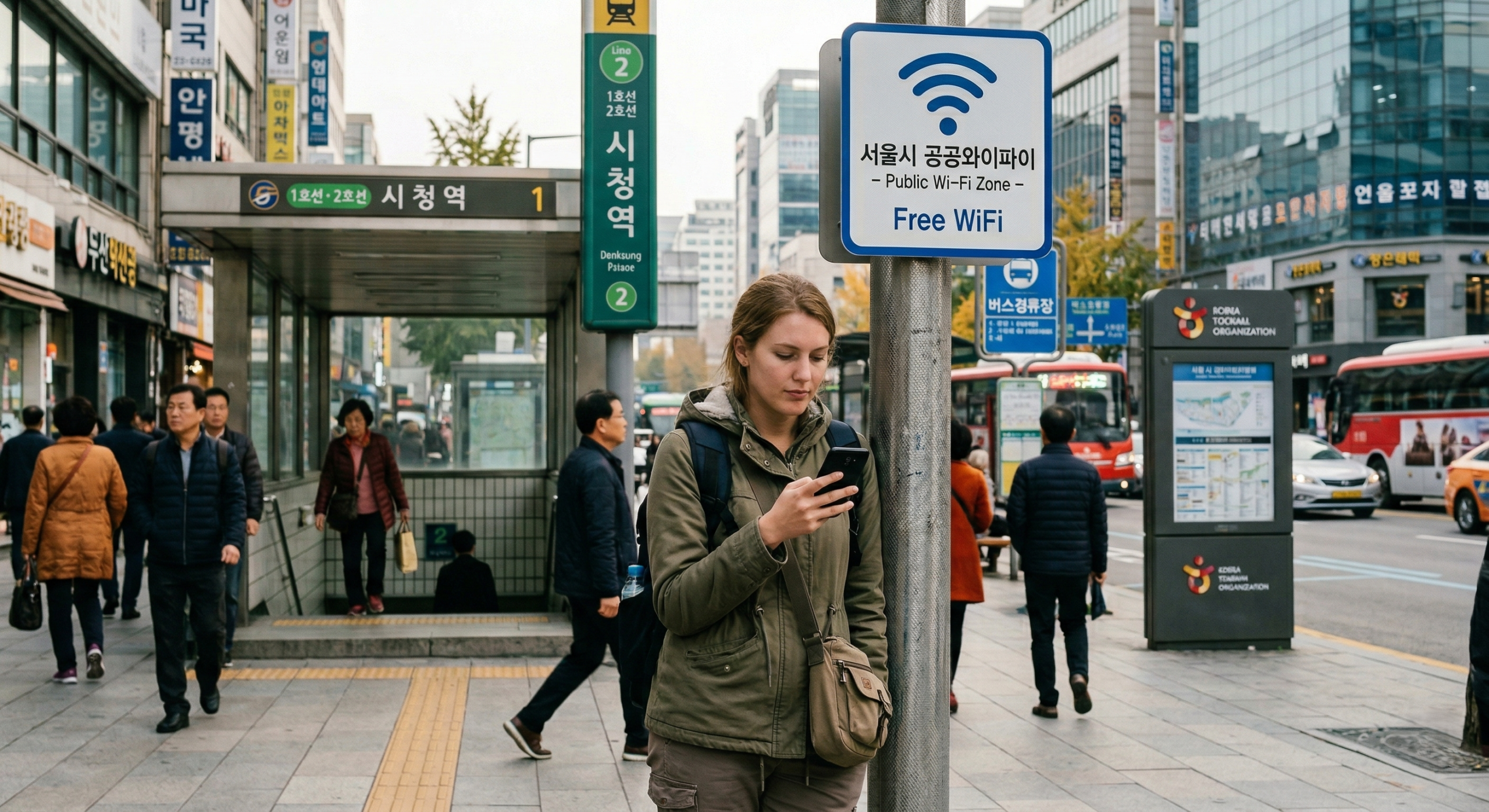
A public Wi-Fi icon in Korea can feel reassuring, misleading, and expensive in lost time — sometimes within the same minute.

It often appears at exactly the wrong moment: outside a subway exit, near a bus stop, in front of a guesthouse door, or halfway through a walking route that suddenly depends on one page loading properly.

Public Wi-Fi in Korea is real, widely visible, and sometimes genuinely helpful. The problem is that visibility and reliability are not the same thing. For travelers, the question is never whether a network appears in the list. The question is whether that connection, in that exact spot, is stable enough to finish one useful task before you need to move again.

Usually safe: one route, one saved address, one screenshot, one quick sync / Usually risky: payment, QR display, booking changes, anything live and fragile / Best mindset: use it to secure the next step, not to carry the next step live
Misreading the signal

Why travelers misread public Wi-Fi in Korea

Many foreign visitors arrive with a simplified mental model. Public Wi-Fi is either strong and easy, like a reliable airport lounge connection, or so unreliable that it is not worth touching at all. Korea sits in a much messier middle ground. Public Wi-Fi is common enough to notice, official enough to look trustworthy, and useful often enough to tempt you into depending on it — but inconsistent enough that it cannot be treated like a private connection.

The most common misreading starts with what the phone shows. An official sign near a subway station, a public building, or a pedestrian corridor creates a sense of reliability before the device has done anything useful. Then the phone joins the network, the captive portal never opens properly, the browser stalls, or the session drops the moment you move toward street level. Sometimes the device auto-joins a remembered public network and clings to it even when that connection is too weak to load anything, which blocks mobile data from taking over when it should. The phone looks online. Nothing actually works.

Timing makes that problem worse. Travelers usually want public Wi-Fi during the most friction-heavy parts of the day: switching subway lines, walking from a bus stop to a guesthouse, approaching a building entrance, leaving a museum area, or checking a final direction after resurfacing from underground. Those are also the moments when edge coverage, foot traffic, and urgency combine to make a public connection feel far less stable than it looked a few seconds earlier.

“Most travelers do not lose time because public Wi-Fi is completely absent. They lose time because a connection looks usable, behaves half-open, and invites one more retry in the exact moment when a fallback would have been smarter.”

Where it holds up

Where public Wi-Fi tends to work better

Public Wi-Fi usually performs best in environments built for people to pause rather than drift through. Larger station interiors, airport terminals, public buildings, museum zones, and some cultural facilities tend to give the network enough time and stability to open properly. In those places, the signal has a better chance to settle before you move again.

That matters because the tasks that fit public Wi-Fi well are brief and self-contained. You are not trying to run a long booking flow or manage a chain of live updates. You are checking one thing, opening one saved page, loading one route, or pulling up one detail you forgot to secure earlier. In a calmer indoor spot, that kind of short task often works fine.

A lot of travelers also underestimate how useful public Wi-Fi can be as a preparation window. If you still need to let a map cache the next neighborhood, sync the transit app, save a restaurant address, open check-in details, or pull up a door code before moving again, public Wi-Fi can be genuinely effective. Used that way, it reduces how much you will need a connection later, which is exactly the kind of job it handles best.

Where it breaks down

Where it looks available but behaves badly

Street-level public Wi-Fi is the easiest thing to overestimate in Korea. Signs near station exits, bus zones, and pedestrian shopping corridors suggest solid coverage, but the real-world performance in those spots can be patchy in a way that feels worse than no connection at all. The icon appears, the bars look strong, and the page still refuses to load. A few steps in either direction can change everything.

Crowded transit zones are another consistent weak point. Around major interchange stations, rush-hour platforms, arrival waves, and heavy sightseeing hours, the network may not collapse completely, but it often becomes unstable enough that you stop trusting it for anything time-sensitive. That inconsistency is what causes most of the stress. A network that loaded one page two minutes ago can still fail on the next task in the same location.

One of the more frustrating patterns appears when the device is technically connected but not genuinely usable. The phone auto-joins a remembered public network, holds onto a weak signal instead of switching to mobile data, and leaves you in a state where everything looks normal while nothing useful loads. This often happens around entrances, exits, or overlap zones where multiple weak signals compete and none of them are stable enough to trust.

Indoor-to-outdoor transitions also catch a lot of travelers off guard. A session that seemed stable inside a station concourse or public building may not survive the walk to street level. By the time the browser fails, you may already be several minutes past the point where the signal was actually strong.

A stable moment usually looks like this

You are indoors or semi-settled, the task is narrow, you already know what you need, and the result can be saved before the connection disappears.

An unreliable moment usually looks like this

You are moving, the task is live, the page matters immediately, and the connection only needs to fail once to create a bigger problem than the original delay.

What it handles well

The kinds of travel tasks public Wi-Fi actually suits

Narrow, low-stakes retrieval tasks are where public Wi-Fi earns its usefulness. Confirming an exit number before heading upstairs, opening a neighborhood map to figure out the correct walking direction, checking the opening hours of a facility you are about to enter, or pulling up a ticketing email long enough to grab a confirmation code — these jobs have a clear end point and produce something you can keep on the phone after the session drops.

Preparation tasks also fit naturally. If you realize you never saved a screenshot of your accommodation check-in details, this is a good moment to fix that. If the transit app has not synced the latest route change yet, let it update now. If you are about to spend a stretch of time underground or enter a zone where you know you will keep moving, use the stable window while you have it.

Public Wi-Fi tends to feel most useful when the traveler is not yet under pressure. Earlier in a transit leg, inside a station rather than outside it, before committing to a specific exit, door, platform, or walking turn — that is when a short task is most likely to finish cleanly and leave you better prepared for the next part of the day.

A good session usually shares the same pattern. The task is narrow enough to finish quickly, the result can be saved immediately, and the next step does not collapse if the connection disappears right after that. Once you start judging public Wi-Fi by that standard, it becomes much easier to see when it is genuinely helpful and when it is simply tempting.

What should not depend on it

The tasks that become expensive when the connection wobbles

Any task that becomes significantly worse if it stalls halfway through should not rely on public Wi-Fi. That category is broader than many travelers expect.

Payment steps, QR code display that must appear on demand, booking modification screens, check-in flows that hold a reservation until confirmed, and live departure data that affects which platform or gate you head toward all carry real cost if they freeze. A slow map load is annoying. A payment screen that locks up at the wrong step can create a much bigger problem, especially when it forces you to re-queue, explain the issue, or guess whether the action actually went through.

Modern travel apps also look simpler than they really are. A screen that appears to be one clean page may still be completing a background confirmation or refreshing live data. If the connection drops in that window, the failure is not always obvious. That visual simplicity makes these tasks look low-risk when they are not.

The useful distinction is between retrieving information and committing to an action. Public Wi-Fi in Korea is often workable for the first. The second deserves a more reliable connection, or at least a backup path you are ready to use the moment the network starts wobbling.

When public Wi-Fi becomes genuinely dangerous

A weak connection becomes far more expensive when the page matters right now and the traveler is already in motion.

— You are standing in front of staff waiting for a QR code to appear.

— You are trying to confirm whether a booking change actually went through.

— You need one live update before choosing a platform, gate, or route.

— You are already late enough that one failed reload changes the whole next step.

What actually makes it fail

The real reasons travelers think it is “not working”

When travelers say public Wi-Fi is “not working,” several different problems are usually being collapsed into one complaint.

The first is the login step. Many public networks in Korea require a browser redirect to open the access session fully, and that captive portal does not always trigger cleanly on every phone or inside every app. If the device joins the network but that browser step never completes, the phone looks connected while the session is not actually active.

The second is signal continuity. A network can be good enough for one short task and then unstable for the next. That is not always a dramatic failure. It is often just the practical limit of shared public infrastructure under variable load. One task at a time, with a clear finish line, works far better than treating the session like open-ended access.

The third is device behavior. Phones make automatic decisions about which signal to join and when to switch, and those choices do not always match what the traveler needs. In major stations and transit hubs with overlapping public networks, the device may keep oscillating or hold onto a degraded connection because it still technically counts as connected.

The fourth is urgency. A marginal connection feels very different when you are relaxed versus when you are already moving, already stressed, and already committed to a path that now depends on something loading immediately. The most expensive Wi-Fi failures are not always the most dramatic ones. They are the ones that happen in motion, under pressure, after you have already waited too long to switch strategy.

Habits that help

The small phone habits that make public Wi-Fi easier to use

Building a small offline layer before leaving a stable connection removes a surprising amount of pressure from the rest of the day. A screenshot album with check-in details, door codes, reservation confirmations, schedules, and saved route images is enough. A downloaded offline map of the area you are heading to is enough. The point is not perfect organization. The point is to stop needing live access for information you already knew would matter later.

Auto-join behavior is also worth checking before you need it. If the phone automatically jumps onto any remembered public network, it may latch onto a weak signal and sit there even when mobile data would be far more reliable. In dense station zones in Seoul or Busan, that can leave the phone stuck in a technically connected state that is practically useless.

A second useful habit is knowing which tasks can wait for a better connection and which ones should be handled immediately. If something is low-stakes and easy to save once it loads, a quick attempt on public Wi-Fi makes sense. If it is time-sensitive or depends on a stable multi-step session, it belongs on a connection you trust more.

The final habit is simple: when public Wi-Fi is working, do not waste the clean window. Load what you need, save it, and move on. The value is not the connection itself. The value is what you leave that moment having secured for the next leg of the day.

Battery level quietly shapes this experience too. Troubleshooting a flaky public connection at three percent battery is a different problem from using that same network with a comfortable charge. When the phone is already low, every reload, map sync, browser retry, and app switch adds pressure. Public Wi-Fi works better as part of a prepared routine than as a last-second rescue after the device is already close to dying.

When it looks connected but nothing works

A cleaner troubleshooting sequence

Start with the browser

Open a standard browser and try loading any basic page. If the captive portal never completed, this often forces it to appear.

Clear the half-connected state

If the phone seems half-connected, forget the network and rejoin it from scratch. If that changes nothing, turn Wi-Fi off and let mobile data take over.

Change position slightly

A station exit, doorway, or sign zone may sit at the edge of coverage even when the network appears strong. A few steps can produce a noticeably different result.

Switch earlier than you want to

If the task is time-sensitive and the connection is clearly unstable, stop troubleshooting and use a fallback. Waiting for one more retry is one of the easiest ways to lose time in Korea.

The correct expectation

Public Wi-Fi in Korea for what it actually is

Korea’s public Wi-Fi infrastructure is real and reasonably well distributed across stations, public buildings, and transit corridors. For travelers, that matters — but only when the expectation matches what the network can actually deliver in the moment.

It handles brief, low-stakes retrieval tasks well. It supports preparation when you have a few calm minutes and a stable signal. It performs much worse under pressure, in motion, and at outdoor edge points where the icon still looks reassuring but the session has already turned unreliable.

Travelers get the most out of public Wi-Fi in Korea when they treat it as a short, useful tool rather than a safety net. Not something to build the whole day around. Not something to trust for fragile steps. But a practical resource that can solve small, specific problems — as long as you have already decided which kinds of problems are safe to hand to it.

That judgment is the real skill. Once you stop reading the Wi-Fi icon as a promise and start reading it as an opportunity with limits, Korea’s public Wi-Fi becomes easier to use, easier to trust in the right moments, and much less likely to waste time when the connection is only good enough for one thing.