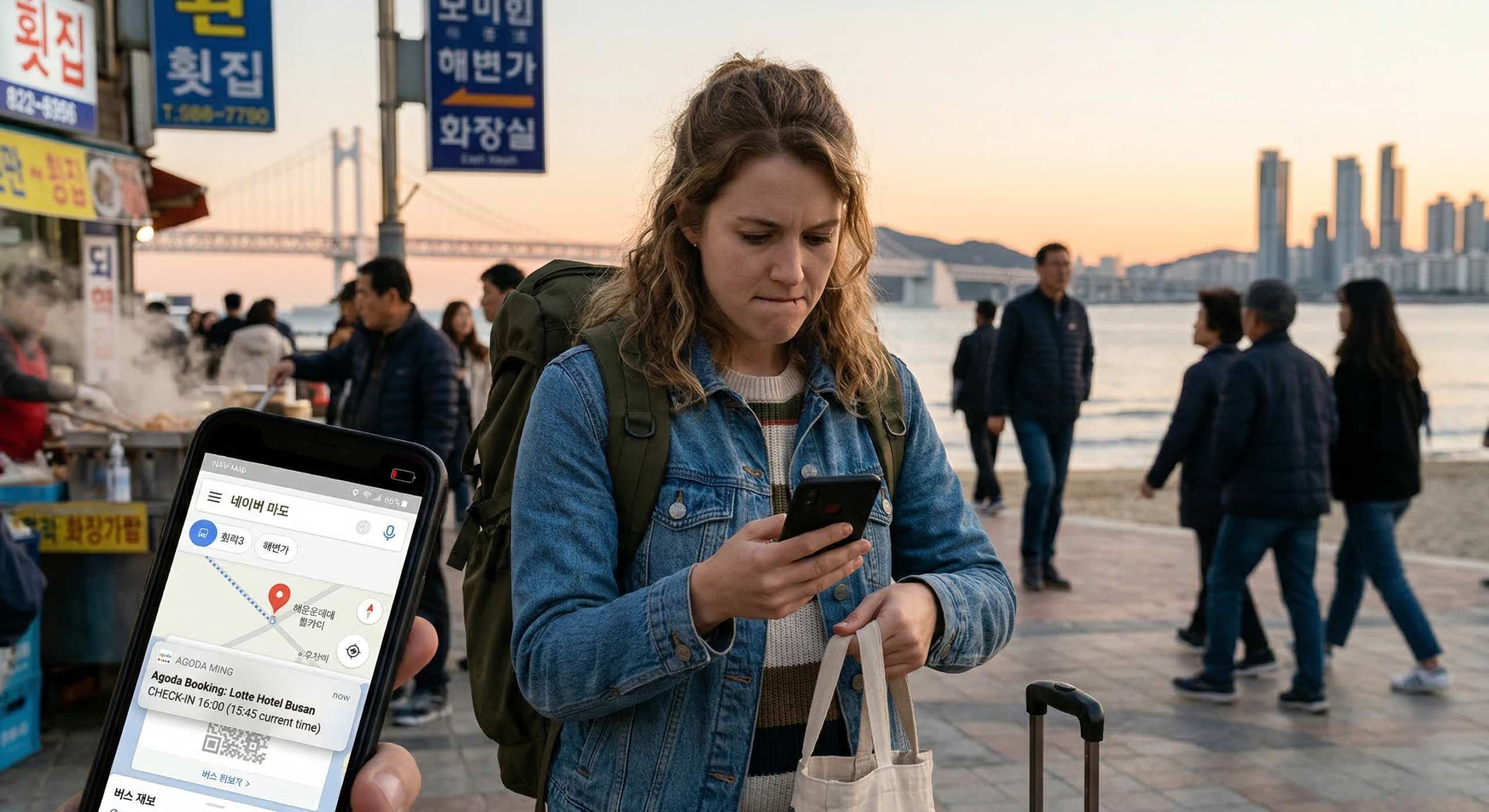
Most Korea travel days do not start going wrong because a phone suddenly dies. The battery is often still there. The signal is still there. The data plan still works. What slips first is access. The thing you need next is not ready at the speed the moment demands.
That distinction matters more than many foreign travelers expect. The route exists, but the last turn is still unclear. The booking exists, but the entry note is buried. The ticket is valid, but the screen you need is not the screen currently open. The hotel message was sent, but not in the app you are checking while standing on the sidewalk with a bag in one hand and bright light hitting the display.
This is why one phone carrying everything becomes a quiet risk in Korea. The device may be holding the map, the train or activity ticket, the accommodation details, the host’s instructions, the café reservation, the return route, the screenshot of a locker number, and the last battery you still have until evening. Nothing looks broken at first. The day just begins slowing down because too many important pieces are being asked to load live, in the right order, on one screen.
Where the problem usually starts
Korea is easy to underestimate from this angle because the infrastructure is usually good enough to create false confidence. The route loads. The trains run. The station names are manageable. Reservations tend to work. That makes visitors assume the digital side of the trip is already “handled.”
The harder part appears later, when several small transitions begin stacking too closely together. The train ride is fine, but the final exit matters. The address is correct, but the entrance may be on the quieter side of the building. The booking is valid, but the name you used to reserve it is not the name you are searching for in your inbox. A pickup point is “nearby,” but nearby inside a crowded district can still mean the wrong side of a large block.
- 1You stop to reopen the map because the street feels slightly wrong.
- 2You leave the map to find a QR code or booking screen.
- 3You realize the code is there, but the surrounding details are not.
- 4You go back to the route because the final approach still does not make sense.
- 5You turn brightness up, open another app, and spend more battery on hesitation than on actual movement.
That is the real bottleneck. Not no service. Not a dead phone. A live phone that is no longer ready at street speed.
A saved booking is not automatically a usable booking. A working route is not automatically a workable final approach. A valid ticket is not automatically presentation-ready.
Split the day before the day gets busy
The strongest fix is usually not technical. It is structural. Before leaving your room, treat the day as four separate lanes instead of one large pile of information.
- Movement The things that get you there: destination pin, final building name, nearest station or bus stop, and one close screenshot of the last stretch instead of only the full route.
- Proof The things that get you in: QR code, booking name, reservation number, train details, session time, or the exact screen a staff member may need to see.
- Contact The path you need if the first plan does not open the way you expected: hotel or host contact method, the property name, the local-language place name if available, and any late-entry or access instructions.
- Fallback The reduced version that still works when live access becomes annoying: screenshots, one starred email, a pinned note, a temporary album, or a message thread containing only the essentials.
The weak setup is the one where those four lanes are scattered across several apps with no front layer at all. The map sits in one place. The QR code is inside email. The entry instructions are in chat. The Korean spelling of the place was never saved. Everything exists, but almost none of it is arranged for a walking day.
A stronger setup is bluntly simple: build one temporary day-use layer before you leave. Not a full archive. Not a permanent system. Just the set of details that will be expensive to retrieve once you are outside.
Build a front row, not a museum of screenshots
Most travelers save information passively. They take screenshots, receive booking emails, open confirmation pages, and assume they will remember where everything is. That works until the day becomes mixed: transport, timed entry, hotel arrival, café booking, luggage, maybe a return route later at night.
A day-use layer is not where information first arrives. It is where you move the details that become expensive once you are already in motion.
- accommodation name and address
- the first place you are actually heading to next
- any reservation or ticket needed that day
- return transport details if the evening may run late
- one offline-friendly copy of the most important route or location
- the meeting point for a tour, class, clinic, spa, or activity
- the Korean-script spelling of a place if it may help on the street
- photos of locker numbers, platform details, luggage tags, or pickup notes if they already matter
The point is not to save everything. The point is to move the costly details into a place you can reach in seconds with one hand free.
Turn accommodation details into sidewalk details
Accommodation access is one of the most common places where foreign visitors discover that having the booking and being able to enter the property are two different things. Booking platforms are good at confirming a stay. They are much less useful when the real problem is the last hundred meters outside the building.
The sidewalk version of the stay usually matters more on arrival than the booking version does:
This matters in Korea because properties do not always present themselves in a way that is easy for a first-time visitor to read quickly. A hotel may be obvious. A guesthouse may sit above a row of shops. A residence-style stay may be inside a mixed-use building where the first sign you notice is not the entrance you need. A place can be close to a well-known area and still be awkward to identify after dark or when you are carrying luggage.
Most route mistakes are not route mistakes
Many travelers save the full route and still get stuck. The route itself was not the main issue. The last 200 meters were.
This is one of the most common Korea travel frictions. The train line was correct. The station exit was correct. The neighborhood was correct. The map pin was broadly correct. But the final approach is where people begin stopping, rotating the phone, zooming in, switching apps, rereading messages, and wondering whether they missed a side entrance, an upper floor, or the correct staircase inside a larger building.
The final stretch deserves its own backup when the destination is a guesthouse, a small hotel, a clinic or spa appointment, a café meeting point, an activity inside a larger complex, a pickup point that is not obvious from the main road, or a venue in a beach town, older neighborhood, or market area.
A wide route screenshot is rarely enough in those cases. What helps more is one close image of the destination label, one final landmark, and the direction of approach. Even better is the exact note that explains the entrance, elevator, floor, gate, or door. Many travel mistakes are not full navigation mistakes. They are final-approach mistakes. The broad trip was right. The last piece was thin.
Make tickets and bookings presentation-ready
A ticket that exists is not the same as a ticket that is ready to use. Presentation-ready means you can reach it fast, show it clearly, and understand the surrounding details without needing another screen immediately afterward.
This matters across more situations than many first-time visitors expect: trains, intercity buses, ferries, observatories, tours, exhibitions, performances, airport bus bookings, and timed-entry attractions. If the item only lives inside a live email or slow-loading app, you are trusting retrieval speed and app stability at the same time.
Do not prepare for every place in the same way
Brightness, glare, wind, and constant movement make screens harder to read comfortably. You are also more likely to be carrying a loose mix of things — drinks, a tote bag, a jacket, a towel, food, maybe wet hands — which makes app switching clumsier. A route that looked simple indoors can feel slow outside when you are moving with other people and trying not to stop every few minutes.
The problem here is usually visual noise. Signs compete with each other. Streets feel less linear. Entrances are not always obvious from the first angle. The right place may be close, but the phone is asking you to interpret a lot of competing visual information while also keeping the route in mind.
The map gets you to the building, not the floor. The address gets you close, not to the correct corridor or elevator bank. The entrance facing the main road may not be the one you actually need. In these places, the phone may be working perfectly. It is simply being asked to solve an inside-the-building problem with outside-the-building information.
The stress comes from sequence. You need the time, then the number, then the right boarding detail, then the physical direction to move. If one part is missing, the temptation is to check too many things at once. That is when travelers start bouncing between tickets, route apps, screenshots, and messages faster than they can actually move through the space.
A location-aware habit works better than a one-size-fits-all backup plan. Before moving to the next stop, ask what that place is likely to do to the phone. Glare? Final-approach confusion? Vertical navigation? A fast presentation screen? Group separation? Once you know the pressure type, you know what should be at the front layer before arrival.
Once the battery starts dropping, reduce the job of the phone
Battery drain during travel is not just about screen time. It is often about indecision loops. Open the map. Leave it. Go back. Search email. Reopen the same booking. Adjust brightness. Check chat. Recheck the address. Zoom in. Stop again. Refresh something that was already half-loaded. That loop burns battery fast while producing very little forward movement.
That is why low battery is partly an organization problem. When the phone is cluttered, every small uncertainty becomes more expensive. Once the battery moves into a range you do not want to gamble with, the role of the phone should narrow.
Protect first
- where you are going next
- what you need to show soonest
- how to reach a person or place if something changes
- the charging cable and power bank in a place you can actually reach
Stop asking it to do
- casual photo-taking for a while
- constant switching between several apps
- refreshing live pages when a saved version would work
- buried-bag charging that starts only after the phone is already a problem
One common Korea travel mistake is packing the power bank and cable too deep inside a shopping bag or suitcase. The charger exists, but it is awkward enough to reach that you do not use it until the phone is already in trouble. Easy access matters. A power bank at the bottom of a packed bag is not fully part of the day yet.
If you are traveling with other people, duplicate the day, not the whole phone
Group travel creates a version of phone fragility that is easy to miss. One person keeps the hotel booking. Another has the ticket email. Someone else carries the power bank. This feels harmless while everyone stays close together, but travel days rarely stay that tidy. Someone steps into a convenience store. Someone walks ahead to check a sign. Someone lags behind with luggage. The person who needs the information is suddenly not the person holding it.
Being in the same group is not the same as sharing access. The stronger setup is not that everybody duplicates every file. It is that at least two devices can keep the day moving if one of them becomes awkward to use.
- at least two people should have the accommodation name and address
- at least two devices should have the next important booking screenshot
- the ticket or confirmation needed soonest should not live in only one inbox
- the return route or transport plan should not be trapped on one phone
- someone other than the “main phone person” should know the contact path for the property or guide
Keep one anchor outside the device
This is not about replacing the phone. The phone will still be central for most travelers. But it is easy to underestimate how much calmer a day feels when one important anchor also exists outside the device.
That anchor might be the accommodation, the evening return route, a reservation name, or the next place you absolutely need to reach. The physical backup can be very small: the accommodation name on a small piece of paper, the Korean spelling copied into a note, a wallet card with the hotel address, the booking number written once in a readable place, or the return station written down before leaving.
The value of that backup is not nostalgia. It is stability. A small physical anchor stops a minor digital wobble from turning into a full decision freeze when you are tired, rushing, or outside at night.
Recover the next useful layer, not the whole phone
When access starts slipping, the instinct is usually to repair everything at once. Reopen every app. Reconnect Wi-Fi. Reload email. Search the booking platform. Recheck the route. Message multiple people. That feels active, but it usually creates more switching and more delay.
The next useful layer just needs to work. That is also the moment when the physical environment can help: a café counter, a hotel desk, a staffed booth, a convenience store seat near an outlet, or simply a place where you can stop moving long enough to save the screenshot you should have taken earlier.
If Wi-Fi becomes available unexpectedly, do not spend the window on random checks. Use it to secure the items that the rest of the day still depends on.
The best phone setup for Korea travel is not the one with the most tools. It is the one that still holds together when the battery is lower, the light is brighter, the street is busier, and the next detail has to appear quickly. If maps, tickets, bookings, and accommodation details stay easy to reach under that kind of mild pressure, the phone keeps supporting the day instead of slowing it down.